

⚙️ Advanced Configuration
Lyzr Studio allows you to fine-tune an agent’s reasoning depth and operational persistence through Advanced Settings. This is critical for managing the balance between thoroughness and latency during complex tasks.How to Configure
- Navigate to your agent in the Agent Builder.
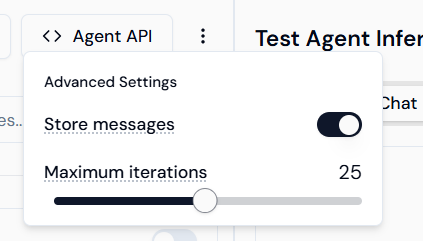
- Click the three vertical dots (menu icon) located in the top-right corner of the agent header.
- Adjust the settings in the dropdown menu that appears:
- Store messages: Toggle this On to maintain conversation history for context.
- Maximum iterations: Use the slider to set a custom limit for the agent’s inference cycle.
🔄 Custom Max Iterations
The Maximum iterations setting (ranging up to 25) defines how many consecutive steps an agent can take to complete a single request. An iteration is consumed whenever the agent performs the following:- Tool Calls: Interacting with external integrations like Gmail, Notion, or Slack.
- Sub-Agent Calls: Delegating tasks to other specialized agents within a workflow.
- Artifact/File Creation: Generating documents, code snippets, or images.
- Self-Correction: If Reflection is enabled, each review and refinement step counts as an iteration.
💡 Tip: Set a higher iteration limit for complex research or data-heavy tasks. For simple, direct responses, a lower limit helps minimize credit consumption and response time.